
A great logo and a great patch are not the same thing.
Your logo lives on a screen, where it can have thirty colors, hairline strokes, and a gradient that fades from navy to gold. Your patch lives on fabric, where thread has physical width, color changes cost money, and detail below a certain size simply disappears. Most patches that come out looking muddy or cheap were not made by a bad manufacturer, they were designed for a screen and never adjusted for the medium they were actually going into.
Custom Patch Design Checklist
A production-ready, eye-catching patch design usually checks every box below. Keep this list open while you design.
- 2 to 4 main colors, no more
- Strong contrast between design and background
- Text no smaller than roughly 4 to 5mm tall, depending on font and stitch type
- Line work at least 1mm thick for embroidery
- Enough negative space that the design reads clearly at a glance
- Design reviewed at actual size, not zoomed in on a screen
- Vector artwork submitted where possible (AI, EPS, or SVG)
Everything below explains why each of these exists and how to apply it to your specific design.
Match Your Design to the Patch Type First
Before you fine-tune contrast or line weight, a faster question is whether your design is even a good fit for the patch type you have in mind. This table gets you there quickly.
| If your design has… | Best-fit patch type | Why |
| A thick, bold logo with 2 to 4 colors | Embroidered | The classic choice, holds bold shapes cleanly and affordably |
| Tiny text or thin, detailed linework | Woven | Finer thread captures detail embroidery would blur |
| A photo or full-color gradient | Sublimated | No thread limitations, reproduces color exactly as designed |
| A raised, 3D, or molded look | PVC | Rubber holds sharp edges and dimensional detail |
| Bold letters or a fuzzy, vintage feel | Chenille | Tufted yarn suits big shapes, not fine detail |
If your design does not cleanly match any row here, that is usually a sign to simplify the artwork rather than force it into a material that was not built for it. For a full breakdown of when to choose each material, see our guide on how to choose the best patch type for your brand.
The Six Rules That Actually Matter
| Rule | What it means | Why it exists |
| Limit your palette | 2 to 4 main colors | Thread changes cost time and money, and too many colors muddy small designs |
| Prioritize contrast | Design color should clearly separate from the background | Low contrast makes shapes blend together once stitched |
| Respect the text minimum | Roughly 4 to 5mm tall for embroidery, depending on font and stitch type | Thread has physical width, tiny letters merge into blobs |
| Respect the line minimum | Approximately 1mm thick for embroidery, though this shifts with stitch type and patch size | Thinner lines either vanish or thicken unpredictably |
| Leave negative space | Do not fill every inch of the patch | Crowded designs lose readability at a glance, which is how patches are actually seen |
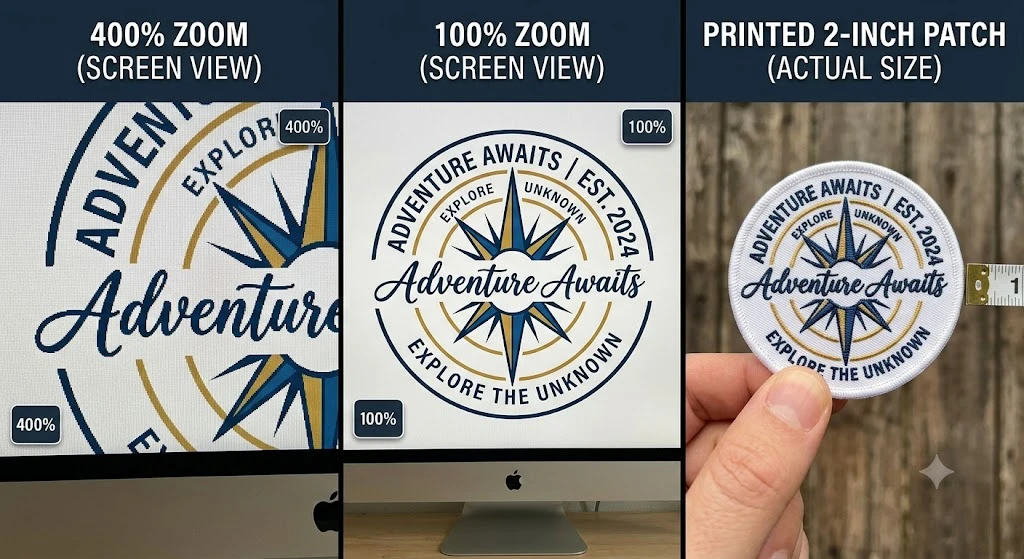
| Design at actual size | Print or view the design at 100%, not zoomed in | What looks fine at 400% zoom often falls apart at 2 inches |
Keep this table nearby, every section below expands on one of these six rules with the reasoning behind it.
Rule 1: Fewer Colors Almost Always Looks Better
It feels counterintuitive, but the patches that get remembered are rarely the ones with the most colors. They are the ones where every color is doing a job.
Many manufacturers include a set number of thread colors in the base price before extra charges apply. That is not just a pricing detail, it is a hint about what actually works. A design built around two or three deliberate colors reads clearly from ten feet away. A design with twelve colors crammed into a two-inch patch usually reads as noise up close and as a blur from a distance.
If your brand palette has five or six colors, that is fine for your website. For the patch, pick the two or three that carry the most identity, usually your primary brand color plus one accent, and let the rest go. You are not simplifying your brand, you are translating it into a different medium.
Rule 2: Contrast Does More Work Than People Expect
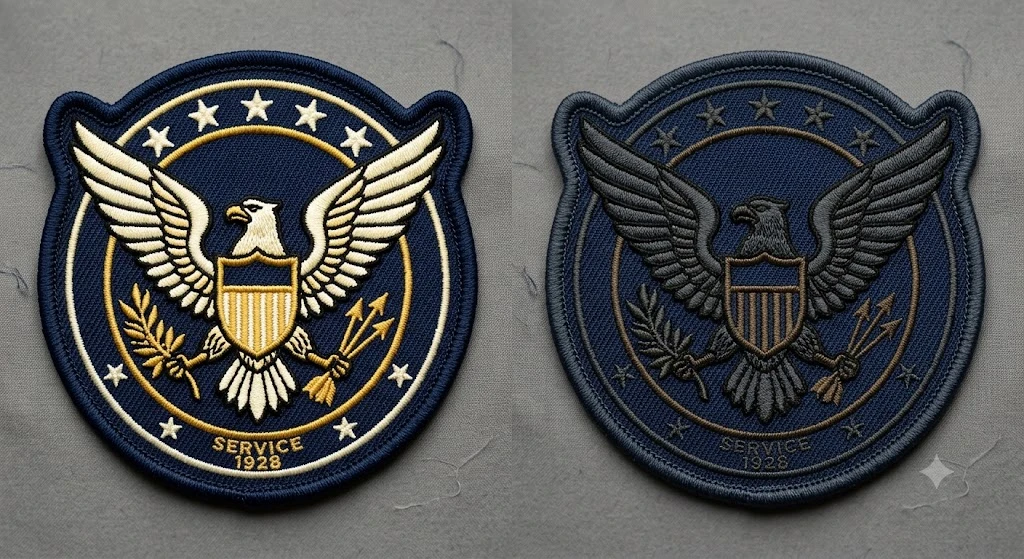
Here is a test you can run in ten seconds. Squint at your design, or turn your screen brightness down until it is hard to see clearly. If the shapes still separate from each other, your contrast is doing its job. If everything blurs into one gray mass, that is exactly what will happen once it is stitched at a smaller size.
White text on black reads clearly from across a room. Dark blue text on black does not, even though it looks fine at full size and full color on your monitor. The same applies to a design element sitting on a similarly toned background, the two shapes need to visibly separate, not just technically differ in hex code.
This matters even more on darker garments. A patch that looks balanced on a white mockup can lose most of its impact once it sits on a navy jacket or a black cap, so it is worth mentally testing your design against the actual garment color it will be applied to, not just a neutral background.
Rule 3: Respect the Text Minimum, Even If It Hurts
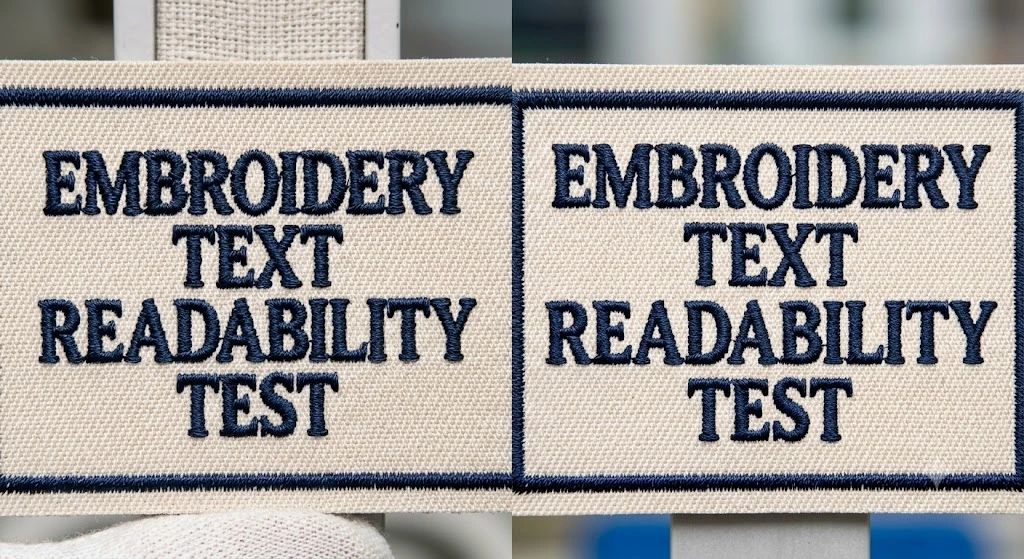
This is the single most common reason a finished patch disappoints someone who approved the digital proof.
Embroidery is built from stitches with physical width. Digitizers generally recommend keeping lettering around 4 to 5mm tall depending on the font and the type of stitch used, satin stitch handles slightly smaller text more cleanly than fill stitch, for example. Push text below that range and it does not scale down cleanly, it turns into a cluster of overlapping stitches that reads as a smudge rather than a letter. This is not a quality issue on the manufacturer’s end, it is a physical limit of stitched thread, the same way you cannot print a legible sentence in one-point font no matter how good the printer is.
If your design has a tagline or fine print you are attached to, you have three real options. Enlarge the patch so the text has room to hit the minimum. Simplify the message down to the words that actually matter. Or switch to a woven patch, which uses thinner thread and can hold text noticeably smaller than embroidery, because the weaving process captures finer detail than stitching physically can.
Whichever you choose, decide before production, not after. A proof approval is your last real checkpoint to catch this.
Rule 4: Thin Lines Need a Different Approach Than Thin Text
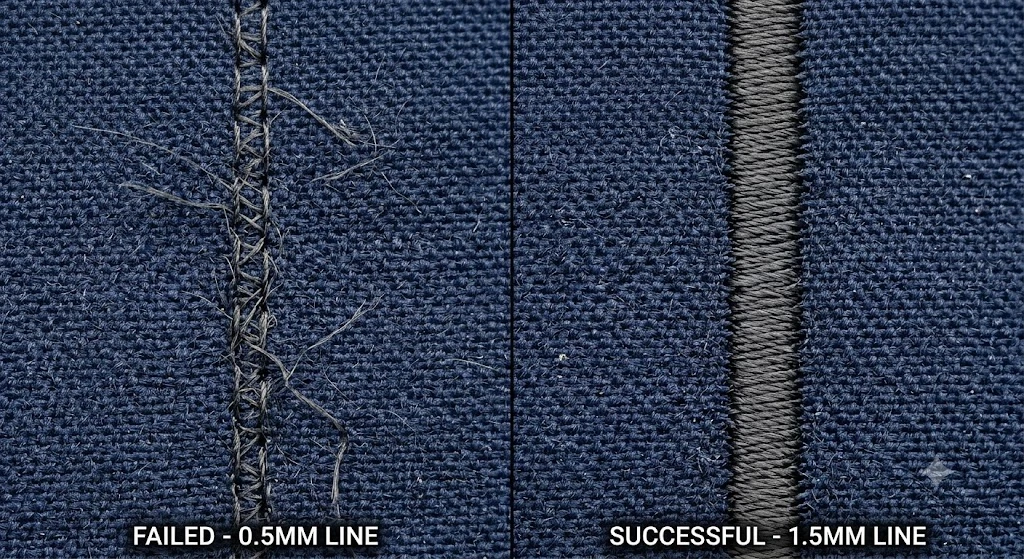
The same physical limit that affects text applies to line work, just measured slightly differently. Embroidery generally holds lines down to approximately 1mm thick before they start to disappear or bulge into a thicker line than intended, though the exact threshold shifts depending on stitch type, stitch direction, and how large the overall patch is.
Thin outline logos, delicate line-art illustrations, and single-pixel-width dividers all run into this. The fix is usually one of two things: thicken the lines in your source file before you submit it, or move the design to woven or sublimated production, both of which can reproduce finer linework than embroidery.
If you are not sure whether your lines will survive the jump to fabric, this is exactly what a digital proof is for. Ask your manufacturer directly whether any part of the design falls under the minimum before you approve anything.
Rule 5: Leave Room to Breathe
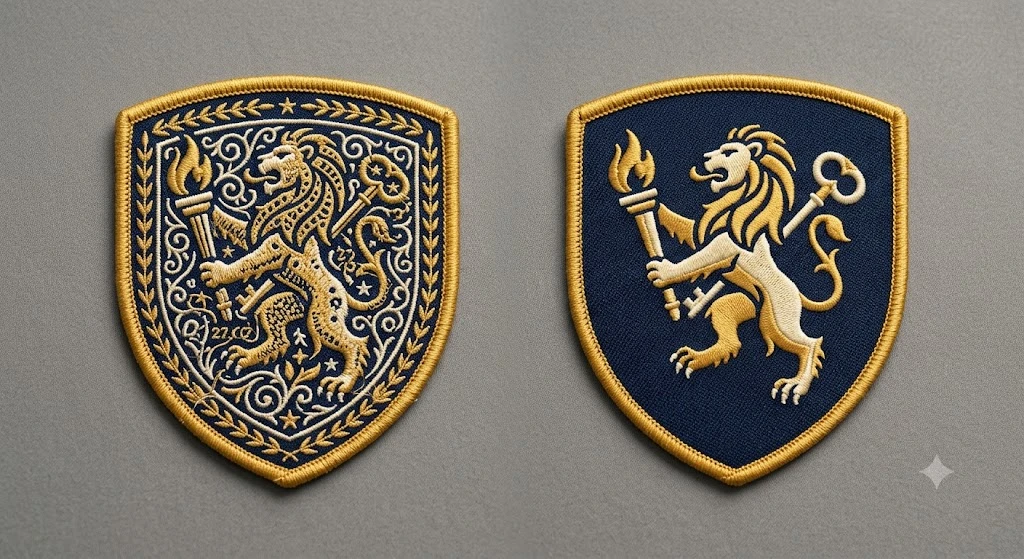
New designers tend to fill every available inch of a patch, assuming more content means more value. It usually does the opposite.
A patch is read at a glance, not studied like a poster. Someone sees it for a second or two on a jacket sleeve or a hat brim, not up close under good lighting. If every part of the patch is competing for attention, none of it wins. Negative space is not empty space, it is what lets your logo, your text, or your central image actually stand out instead of fighting fifteen other elements for the same square inch.
If you are torn between adding one more element and leaving it out, leave it out. You can almost always simplify further than feels comfortable and the patch will read better for it.
Rule 6: Judge It at Actual Size, Not Zoomed In
This is the rule almost everyone skips, and it is the fastest way to catch a problem before it becomes an expensive one.
Designs get built and approved on a screen, often zoomed in well past 100%, where every detail looks sharp and every color looks distinct. That is not how anyone will actually see the finished patch. Print your design at its real, physical size, on paper if you have to, and look at it from a normal viewing distance, arm’s length or further. Better yet, hold it up against the actual jacket, hat, or bag it will go on.
What survives that test is what will survive production. What disappears at actual size will disappear once it is stitched too, no matter how good it looked at 400% zoom.
A Few Production Terms Worth Knowing
You do not need to become a digitizer to design well, but a handful of terms come up often enough that knowing them helps you communicate clearly with whoever produces your patch.
Digitizing is the process of converting your artwork into a stitch file a machine can actually sew, this is where text size, line weight, and stitch type get finalized.
Satin stitch is a tight, zigzag stitch used for text, borders, and thin shapes, it holds detail slightly better than fill stitch at small sizes.
Fill stitch covers larger open areas with a dense pattern of parallel stitches, efficient for backgrounds and bigger shapes.
Stitch density refers to how tightly packed the stitches are, higher density gives a richer, more solid look but adds thread and cost.
Merrow border is the traditional raised, rolled edge stitched around a patch, the classic finished look most people picture.
Knowing these terms mostly helps you ask better questions during the proof stage, not something you need to master before you design.
File Preparation: What to Send and Why It Matters
Design decisions matter, but so does the file itself.
Vector files, AI, EPS, or SVG, are the gold standard because they scale to any size without losing quality, which matters since your logo file might be built for a business card and needs to work at 2 inches or 12 inches on a patch. If you only have a raster file, PNG or JPG, aim for at least 300 DPI at the actual size you plan to print, a low-resolution logo pulled from a website will look soft or pixelated once enlarged and digitized.
If you do not have a clean source file at all, describe what you want or send a rough sketch, most patch manufacturers, including ours, offer free digitizing where a designer rebuilds your artwork properly for stitching rather than working from a compressed screenshot.
Common Mistakes, and What They Actually Cost You
Designing in full color for embroidery, then being surprised by the price. Embroidery has a per-color cost structure. A photorealistic gradient logo is not just hard to stitch cleanly, it can meaningfully raise your price per piece compared to a simplified two or three color version.
Choosing a font that looks great at business-card size. Script fonts and thin serif fonts often fail the text minimum test badly. Bold, sans-serif fonts like Helvetica or Arial hold up far better at small sizes, save the decorative font for anywhere the text is large enough to survive it, generally an inch or more in height.
Skipping the digital proof review. The proof is not a formality, it is the one point in the process where you can still catch a text-size or contrast problem before it becomes five hundred finished patches. Look at it as carefully as you would review a final print file, because functionally, that is exactly what it is.
Assuming your desktop screen is a reliable preview. A design that looks balanced at your monitor’s resolution and brightness can look completely different in daylight on a hat brim. Print it out. It takes thirty seconds and it is the single best mistake-catcher on this entire list.
Design Tips by Where the Patch Will Actually Go
The same logo needs slightly different treatment depending on where it ends up.
Hats and caps curve, so avoid placing critical detail at the very top or bottom edge of the design, where the curvature distorts it most. Keep the core of your design centered where the surface is flattest.
Jacket sleeves and small chest patches are usually under 3 inches, which means Rule 3 and Rule 5 matter more here than almost anywhere else, simplify harder than you think you need to.
Back patches, often 10 to 12 inches, give you room for detail that would be impossible at chest-patch size, but resist the urge to fill all of it, the same negative space principle still applies at scale.
Bags and gear get handled and set down constantly, so consider slightly bolder linework and less delicate detail than you might use on a jacket that stays relatively still.
From Design to Production
Once your design follows the rules above, here is what actually happens next.
- Send your file. Vector art, a raster logo, or a sketch and description all work.
- Get a free digital proof. We will review your design for free and flag if any text, lines, or details fall under the minimums before production begins, not after.
- Review it at actual size. Do not approve from a zoomed-in screen, check it the way you would view the finished patch in real life.
- Approve or request changes. Adjust size, colors, or detail level until it matches what you pictured.
Not sure if your design will hold up in production? Send us your artwork and we will tell you honestly if anything needs adjusting before you commit to a full order. It is far easier to fix on a screen than on five hundred finished pieces.
If you are still deciding which material fits your design best, see how to choose the best patch type for your brand. For the broader step-by-step creation process, including patch types and general starting advice, read our guide on how to design your own embroidered patch.
Frequently Asked Questions
What is the minimum text size for a custom embroidered patch? Roughly 4 to 5mm tall, depending on the font and stitch type used. Text smaller than that tends to merge into an unreadable blob once stitched, since embroidery thread has a physical minimum width it can hold cleanly.
How many colors should a patch design have? Two to four main colors generally works best. Many manufacturers include a set number of thread colors in the base price, and simpler palettes read more clearly at small sizes than busy ones.
Why does my patch look different from my logo file? Usually because the design was built for a screen rather than for thread. Fine gradients, hairline strokes, and tiny text all behave differently once translated into stitched or molded material, which is why checking against the rules above before production matters.
What file format should I use for a custom patch design? Vector files, AI, EPS, or SVG, are ideal since they scale without losing quality. If you only have a raster file, aim for at least 300 DPI at the size you plan to print.
Can I use a gradient in my patch design? Traditional embroidery cannot stitch a true gradient, it produces solid color blocks, though skilled digitizers can simulate a soft transition in some cases. If your design depends on a real gradient or photo-level detail, sublimated or printed patches reproduce it far more accurately.
How do I know if my design has too much detail for a small patch? Print the design at the actual patch size and look at it from a normal viewing distance. If text blurs together or shapes are hard to distinguish, the design needs to be simplified or the patch needs to be larger.
What fonts work best for small text on patches? Bold, sans-serif fonts like Helvetica, Arial, or Futura hold up best at small sizes. Script or thin serif fonts often fail the minimum text size test and should be reserved for larger patches where the text has more room.
Can every logo be turned into an embroidered patch? Most can, but logos with gradients, tiny text, or extremely fine detail usually need simplification first, or a different patch type such as woven or sublimated, since embroidery cannot physically reproduce that level of detail cleanly.
Should I convert my logo to vector before ordering? It helps significantly. A vector file scales cleanly to any patch size without quality loss, and it gives the digitizer a cleaner starting point. If you do not have a vector version, most manufacturers can recreate one from a raster file or sketch as part of the digitizing process.